Casino Ads on Facebook: How to Get Approved and Plan Your Campaign
- Author
- PrimeSpy Research Team
- Published
- Nov 8, 2026

Can you run casino ads on Facebook? Yes, in some markets. But real-money gambling is a restricted advertising category. Before promoting an online casino, you need Meta authorization for the ad account and a legal basis to advertise in every market you target.
The first step is to classify your offer. A real-money casino, a free social casino game, and a physical casino can fall under different parts of Meta’s Online Gambling and Games policy. The ad and its landing page both matter.
Which casino ads on Facebook need authorization?
Meta requires authorization for ads promoting online gambling when something of monetary value is involved in entry or prizes. Its policy covers casino games, poker, betting, lotteries, fantasy sports, sweepstakes, and similar offers. It also covers ads leading to gambling-related affiliate or aggregator pages, even when visitors cannot place a wager on those pages.
A free game is not automatically exempt. If players can win something with monetary value, or pay for an advantage toward such a prize, Meta may treat the offer as online gambling. Review the game mechanics, rewards, and landing page before deciding which rules apply.
Social casino games have a separate path. These games simulate gambling but do not offer prizes with monetary value. They may run without prior Meta authorization if they target adults and avoid Meta’s prohibited markets. Virtual rewards cannot be redeemable or tradable for money or other value.
Ads for physical casinos may also be exempt from the online gambling authorization requirement when neither the ad nor its destination promotes online gambling. Other Meta rules and local laws still apply.
How to apply to run casino ads on Facebook
Meta grants online gambling authorization to specific ad account IDs. Approval for one account does not automatically cover another.
According to Meta’s application guide, the process starts in Meta Business Suite:
- Open Authorizations and verifications.
- Find Online gambling and gaming ads, then select View details and Request authorization.
- Choose your business type: operator, aggregator, affiliate, or agent.
- Select the territories and gambling types you intend to advertise.
- Enter your legal business name, advertising URLs, and ad account IDs.
- Upload the relevant licenses or other documents showing that the activity is lawful in the selected markets.
- Review the gambling addendum and submit the application.
Meta reviews the request, sends its decision by email, and displays the status in Business Suite. Required documents vary by business type, territory, and gambling product. Your business name should match your supporting legal documents.
If you later want to target a new jurisdiction or promote a new gambling type, declare that expansion through Authorizations and verifications before launching. Meta also provides a process for extending an existing authorization to another ad account in the same business portfolio.
Check the market and audience before launch
Authorization does not make every market available. Meta prohibits online gambling ads in its listed unsupported markets and requires advertisers to follow local law wherever they operate. It also forbids targeting people under 18. A jurisdiction may set a higher minimum age, in which case the stricter rule applies.
Before launching in a market, confirm that:
- Your product is lawful to advertise there.
- Your license or other legal basis is current.
- The ad account has the required Meta authorization.
- The campaign’s location and age settings match those conditions.
Use Meta’s policy page for the current unsupported-market list. A list copied into an older article may no longer be reliable.
Build ads that match the approved offer
Once your account is authorized, review the entire path from ad to destination. The creative, offer, URL, and landing page should describe the same product. A casino ad leading to a different gambling offer or an undisclosed affiliate page creates an avoidable review problem.
Keep claims precise. If you advertise a bonus, make its conditions clear. Avoid language suggesting guaranteed wins or effortless income. Check whether the target jurisdiction requires age notices, responsible gambling information, licensing details, or specific offer terms. A creative that works in one market may need changes for another.
Before submitting an ad, review its image or video, headline, primary text, call to action, landing page, and any pages reached before registration. Each element should fit the approved gambling type and territory.
Find long-running casino ads in PrimeSpy
To find casino ad examples, open PrimeSpy’s Meta ad search and search for “casino.” Set Ad status to Active, then sort by Running time to bring the longest-running ads to the top. PrimeSpy also has a running-time filter if you want to narrow the results further.
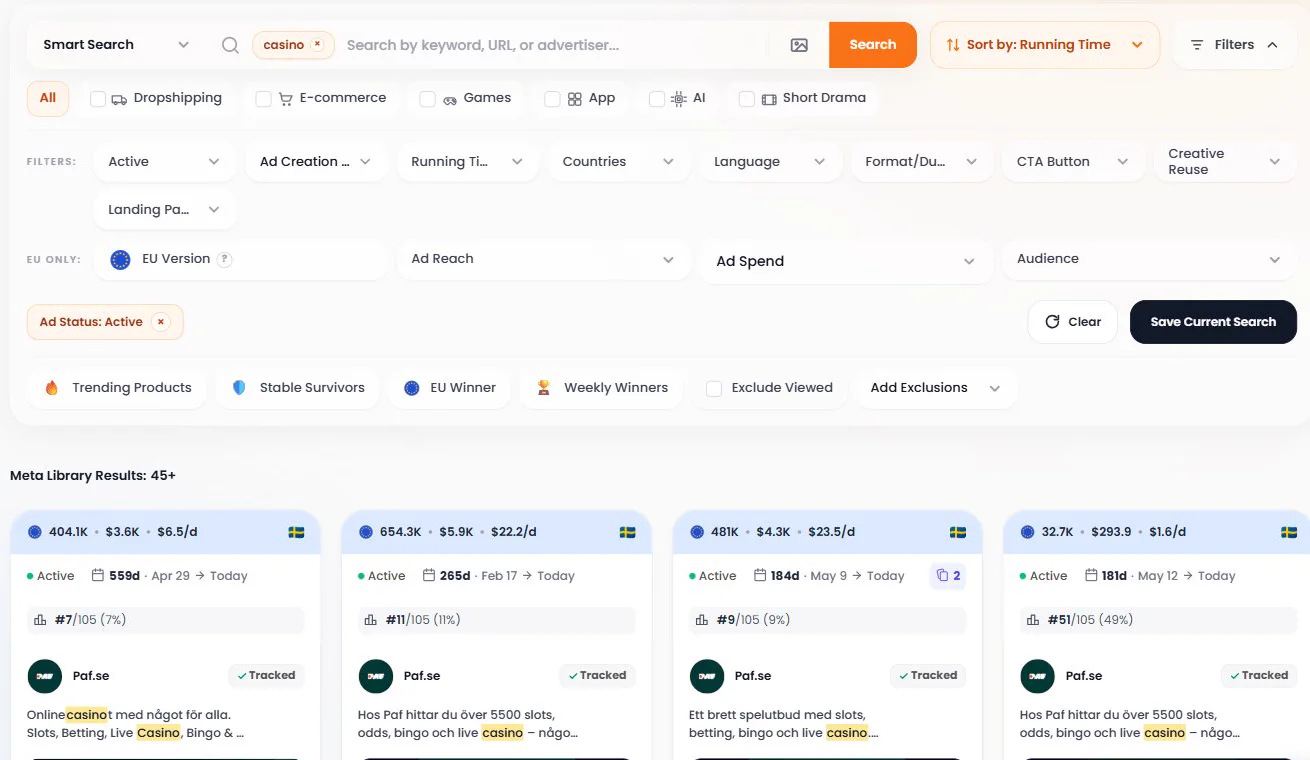
Start with ads that are still active after a substantial period. Look at the creative, offer, call to action, and landing page together. Which game or benefit leads the message? How are bonus terms presented? Does the destination match what the ad promises? Narrow the results by country when researching a specific market, and remove unrelated matches that happen to mention “casino.”
A long run is a useful signal that an advertiser has kept an ad live, but it does not prove the ad is profitable or compliant in your target market. Use the patterns to develop your own creative tests, then check each offer and landing page against your Meta authorization and local advertising rules.
Why a casino ad may be rejected
When an ad is rejected, start with the reason shown in Meta’s account tools. Then check for a mismatch between the campaign and its authorization:
- The ad account lacks authorization for the product, territory, or gambling type.
- The ad or landing page promotes online gambling even though the campaign was treated as an exempt offer.
- The audience includes an unsupported market or people below the applicable minimum age.
- The advertised URL, business details, or offer differs from what was submitted.
- The creative or landing page makes a misleading claim or omits information required locally.
Correct the underlying issue before requesting another review. Rewording the ad will not resolve a missing authorization or an ineligible market.
Frequently asked questions
Can affiliates run casino ads on Facebook?
Yes, subject to Meta authorization and applicable law. Meta includes affiliates in its application process and says partners publishing online gambling ads must apply. For partnership ads published by an operator, Meta describes a narrower case in which a tagged partner does not need separate authorization. Check the application guide before choosing the account that will publish the ad.
Do free social casino games need approval?
They may not need prior authorization if they offer no chance to win money or anything else with monetary value. They must still target adults and avoid prohibited markets. A game that lets players sell or exchange virtual prizes for value needs review under Meta’s online gambling rules.
Does Meta approval cover every country and ad account?
No. Meta ties authorization to specific ad accounts. Advertisers must also declare new jurisdictions or gambling types before expanding, and each market has its own legal requirements.
Casino ads on Facebook are possible when the product, market, account authorization, targeting, and destination all line up. Settle those requirements first. Then use long-running ads as research material for original creative tests within your approved markets.