How to Find and Use Facebook Ad Keywords for High-ROAS Campaigns
- Author
- PrimeSpy Research Team
- Published
- Aug 6, 2026

Summary: Facebook ad keywords are most effective when they come from proven market signals, not guesswork inside Ads Manager. The article explains how to identify keyword themes from long-running competitor ads, map those themes to Meta interest categories, use them as seed signals in Advantage+ Audience, and validate performance through creative testing. It gives advertisers a practical workflow for connecting keyword research, competitor ad intelligence, audience setup, and high-ROAS campaign optimization.
Step 1: Identify Winning Competitor Creative with Ad Intelligence
Finding effective Facebook ad keywords does not start inside Meta’s ad platform. It starts by studying what is already working in the market. Ads that stay live for 30 or more days are doing so because they are generating profitable results — and ad longevity is one of the most reliable indicators of a winning keyword and targeting strategy because Meta’s algorithm tends to suppress unprofitable campaigns quickly. In other words, a competitor’s evergreen creative is a roadmap handed to you for free.
Here is how to extract those keyword signals systematically:
- Open an ad intelligence tool such as a popular ad intelligence tool and navigate to the competitor research filter. If you are evaluating which platform suits your workflow, a comparison of leading tools for ecommerce growth can help you choose the right fit before you start.
- Filter results by ad duration — set the minimum active period to 30 days. This single filter removes all test creatives and surfaces only the ads that are earning their ad spend.
- Scan ad copy for recurring phrases. Look for product descriptors, outcome-focused language, and urgency triggers that appear across multiple ads from different advertisers. These repeated phrases signal category-level demand, not just one brand’s preference.
- Isolate pain-point keywords — the specific problems, frustrations, or desired transformations that the copy addresses directly. Phrases like “eliminate back pain overnight” or “never run out of stock again” point to the emotional trigger a competitor is targeting heavily.
- Sort by estimated reach to prioritize ads with large audience exposure. High reach confirms that the targeting behind that creative is scalable, not a niche experiment with a tiny custom audience.
- Build a swipe-file spreadsheet documenting every high-intent phrase, pain-point descriptor, and product term you find. Group similar phrases into themes — those themes become your targeting clusters in the next step.

The 30-Day Rule: Any ad that has run continuously for 30 or more days should be treated as validated market intelligence. Treat its language as a proven keyword hypothesis, not just creative inspiration.
Once your swipe file is organized by theme, you are ready to map those creative clusters directly into Meta’s targeting system — which is exactly what Step 2 covers.
Step 2: Map Creative Themes to Meta Interest Categories
With a set of creative themes pulled from competitor research, the next task is to translate those themes into structured targeting parameters inside Meta Ads Manager. Using the right Facebook ads targeting tools at this stage bridges the gap between qualitative creative observation and quantitative audience selection. According to digital strategist Lukáš Konečný, creative variance explains 3–4× more of the difference in campaign performance than targeting structure does — which makes aligning your interests to your creative themes a compounding advantage, not just a housekeeping task.
Here is how to move from raw creative themes to a mapped interest list:
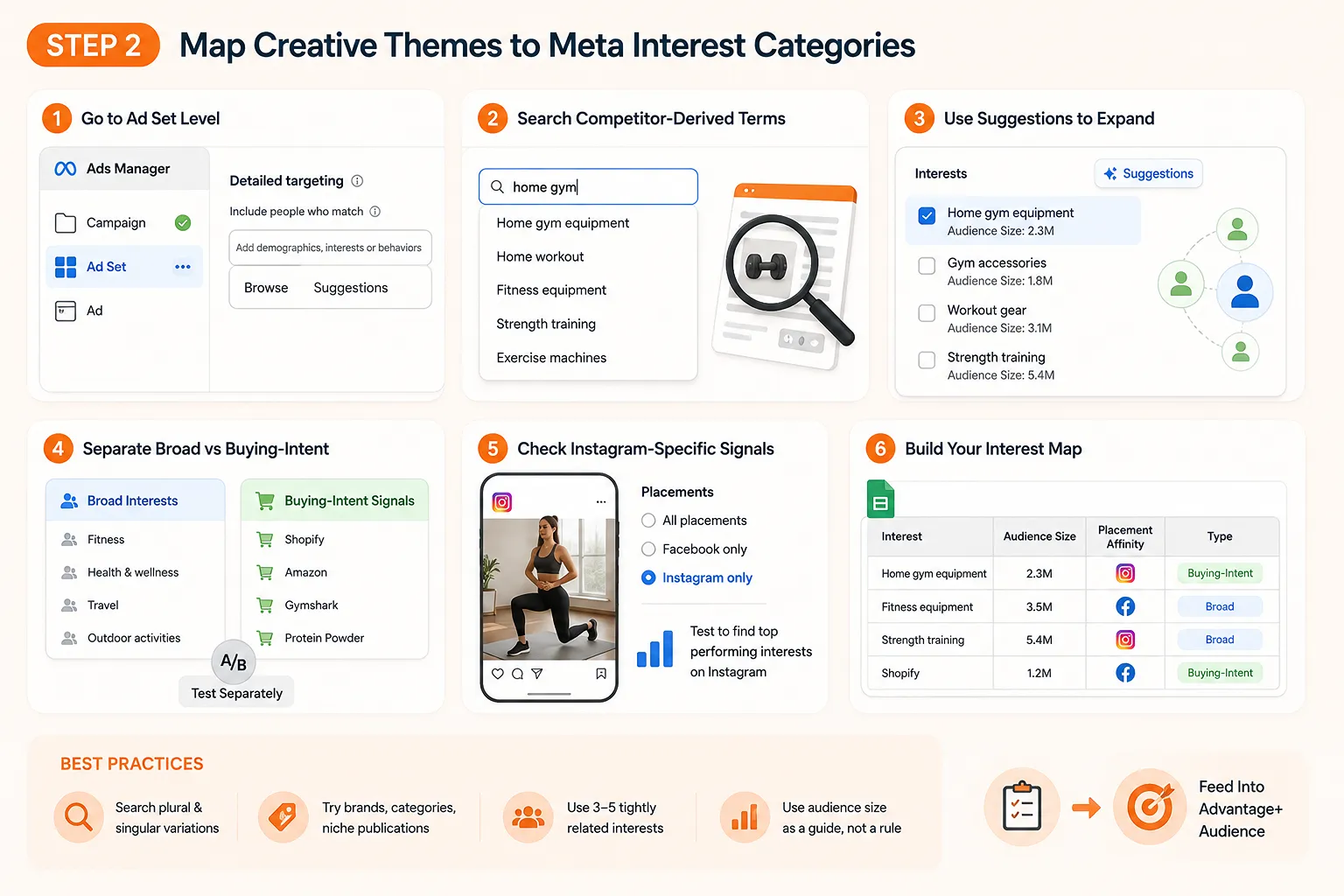
- Open Meta Ads Manager and navigate to the Ad Set level of a new or existing campaign, then scroll to the Detailed Targeting section.
- Input competitor-derived terms directly into the Detailed Targeting search bar. Enter the product categories, lifestyle signals, and content themes you identified in Step 1. Each term surfaces a dropdown of available interest categories — note both the exact matches and the closest synonyms Meta returns.
- Activate the Suggestions feature by clicking “Suggestions” next to any interest you have already added. Meta will surface adjacent interests that share significant audience overlap. Prioritize suggestions with audience sizes above 1 million, as smaller pools tend to restrict delivery and raise CPMs.
- Differentiate broad interests from buying-intent signals. Broad interests (e.g., “fitness” or “travel”) describe lifestyle categories, while specific interests tied to brands, publications, or tools indicate active consumption behavior. Buying-intent signals, such as interest in specific e-commerce platforms or financial products, tend to convert at a higher rate because they reflect deliberate engagement. Separate these into two targeting groups so you can test them independently.
- Cross-reference your interest list with Instagram-specific audience signals. Because Meta’s audience targeting options span both platforms, some interests perform differently on Instagram placements. Filter your ad set for Instagram-only delivery in a test campaign to identify which interests generate stronger engagement signals there before combining placements.
- Document your final interest map in a structured spreadsheet, noting audience size, placement affinity (Facebook vs. Instagram), and whether the interest is broad or buying-intent. This reference list becomes your seed input for the next stage of configuration.
Best practices for the Detailed Targeting search bar:
Search plural and singular variations of each term — Meta indexes them separately
Try brand names, competitor product categories, and niche publications as search inputs
Avoid stacking too many interests in a single ad set; 3–5 tightly related interests typically outperform broad combined pools
Use the audience size estimator as a directional signal, not a hard rule
Pairing this interest map with a reliable ad intelligence workflow ensures your selections are grounded in real market behavior rather than platform defaults. Once your interest map is complete, the logical next step is feeding those keywords into Meta’s Advantage+ Audience configuration — which allows the algorithm to use your research as a starting point while retaining the flexibility to scale beyond it.
Step 3: Configure Advantage+ Audience with Keyword Seed Lists
With your interest categories mapped from Step 2, the next task is to load those insights directly into Meta’s campaign structure. This step shows you how to configure Advantage+ Audience so your researched keywords act as intelligent starting points rather than rigid fences—letting the algorithm do the heavy lifting while your data steers it in the right direction.
Open your Ad Set settings inside Meta Ads Manager and navigate to the Audience section. You will see two options: Manual Audience and Advantage+ Audience. Select Advantage+ Audience to unlock Meta’s AI-enhanced targeting layer.
Enter your keyword seed list under the “Audience Suggestions” field rather than locking in hard demographic or interest constraints. Each keyword or interest phrase you uncovered through Facebook keyword search research goes here as a soft signal, not a mandatory filter. According to Meta’s documentation on ad targeting options confirms that suggestion inputs guide the algorithm without capping its reach.
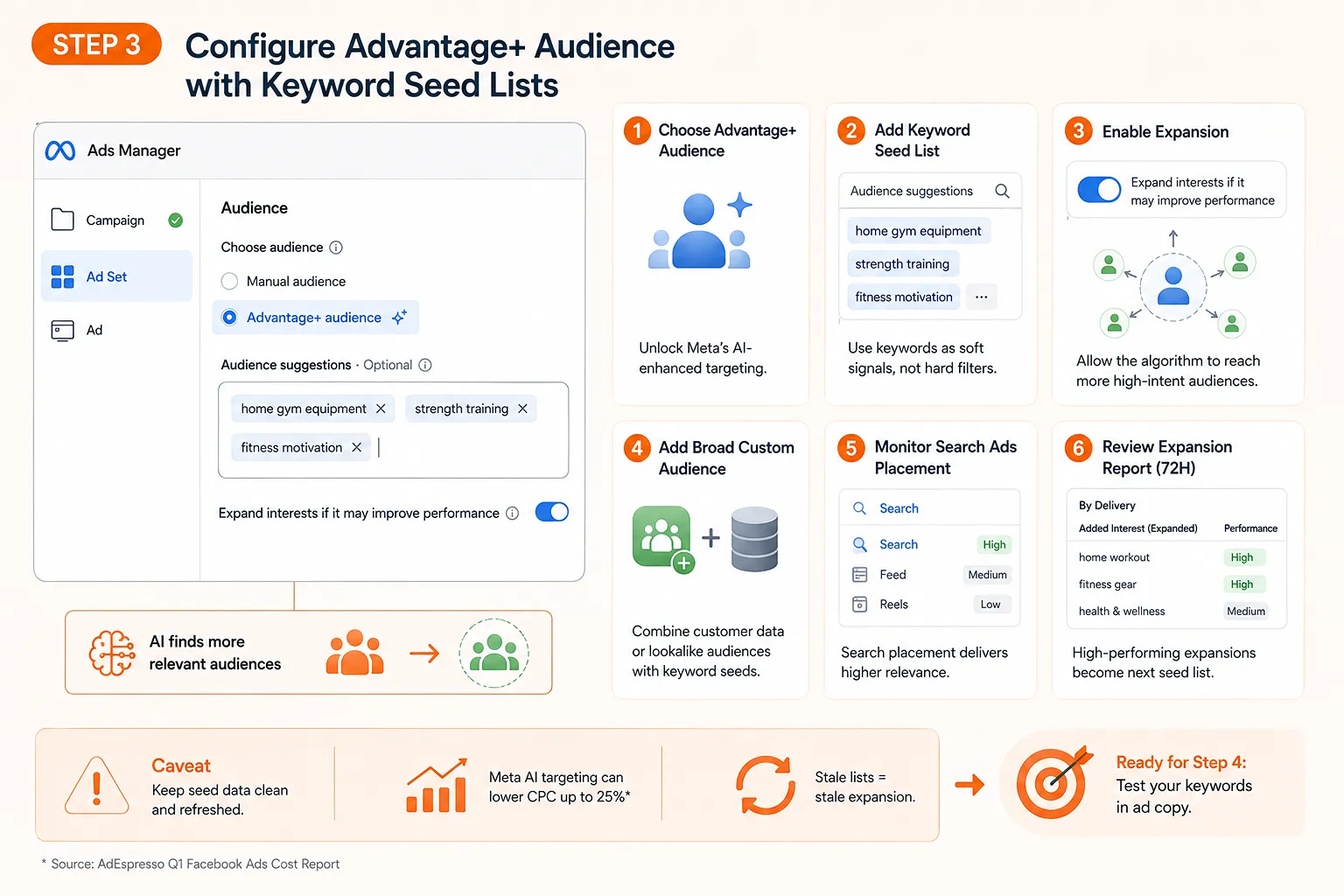
Enable expansion beyond your seed list by leaving the “Expand interests if it may improve performance” toggle active. This is a deliberate choice. According to the Digiday report on Meta’s search ads product, media buyers who allow algorithmic expansion consistently reach higher-intent audiences that manual keyword lists would have missed entirely.
Add a broad custom audience layer as a secondary signal. Upload a customer list or pixel-based lookalike to give the algorithm behavioral anchors alongside your keyword suggestions. This combination tends to work better than keyword seeds alone, particularly in competitive verticals. For a deeper look at how ad intelligence platforms surface the creative data that feeds these lists, explore how alternative ad libraries work.
Monitor the Search Ads placement specifically within Ads Manager’s placement breakdown report. Because Meta’s search placement surfaces ads against user queries, keyword relevance is measurably higher there than in Feed or Reels. Check impression share and click-through rate for this placement weekly and reallocate budget toward it if relevance scores are strong.
Review the audience expansion report after 72 hours of delivery. Navigate to the Breakdown menu, select “By Delivery,” and examine which interests Meta added beyond your original suggestions. Any high-performing expanded interest that appears there becomes a candidate for your next seed list iteration.
One important caveat: Advantage+ Audience is not a set-and-forget system. The AdEspresso Q1 Facebook Ads Cost Report notes that Meta’s AI-powered targeting can reduce Cost Per Click by up to 25% compared to manual approaches—but only when the seed data is clean and refreshed regularly. Stale keyword lists will produce stale expansion. And if you want to ensure your seed data stays competitive, running periodic checks through ad intelligence platforms helps surface new creative themes worth adding.
With your Advantage+ configuration live and your keyword seeds loaded, the logical next question is whether those specific keywords are actually pulling their weight in your ad copy—which is exactly what Step 4 addresses through structured creative testing.
Step 4: Validate Keyword Performance via Creative Testing
Once your Advantage+ audience is loaded with keyword seed lists, the real work begins: confirming that your keyword-to-creative alignment is actually driving results. This step closes the loop on how to find keywords for Facebook ads by turning your research into measurable proof. According to Nielsen Catalina Solutions, high-quality creative accounts for 56% of a brand’s sales lift from digital advertising — which means keyword selection only pays off when the ad copy itself reinforces the same intent signal.
Align your headline copy with the primary keyword from Step 1. Pull the top-performing keyword theme identified in your competitor research and place it in your headline or first line of body copy. The algorithm reads your creative to understand context, so a headline that mirrors the interest category you seeded in Step 3 reinforces the signal and improves delivery quality to relevant users.
Duplicate your ad set to create a direct comparison. Set one ad set to Manual Interest targeting using the categories mapped in Step 2, and configure the second as an Advantage+ audience with your keyword seed list as suggestions. Keep every other variable — budget, creative, offer — identical. This isolation is what gives the test its validity.
Run both ad sets for a minimum of seven days before drawing conclusions. Meta’s delivery system requires a learning period to exit the exploration phase. Pulling results too early produces misleading cost-per-action data. A common pattern is to allow at least 50 optimization events per ad set before comparing performance.
Track Ad Recall Lift and Sales Lift as your primary success metrics. These measure whether the keyword-creative pairing is connecting with the right audience at a cognitive level, not just generating cheap clicks. You can access these through Meta’s Brand Survey tool inside Ads Manager. A rising Ad Recall score alongside a declining CPA is a strong signal that your creative-keyword match is working. If you want additional context on which creative patterns are sustaining long-term spend across the market, browsing ad intelligence platforms can surface patterns your own data cannot.
Identify the winning pairing by CPA, then cut the underperformer. Once both ad sets have sufficient data, compare cost per acquisition directly. The pairing — whether Manual or Advantage+ — that maintains the lower CPA should receive the majority of budget. Do not average the two; let the data make the decision.
Iterate the creative, not the audience, in the next cycle. In practice, when CPA starts to climb, the instinct is to change targeting. But because the keyword seed list is already doing its job as a suggestion layer, the more effective adjustment is to refresh the headline or offer language. Swap in a new keyword theme from your research backlog and run the validation cycle again.
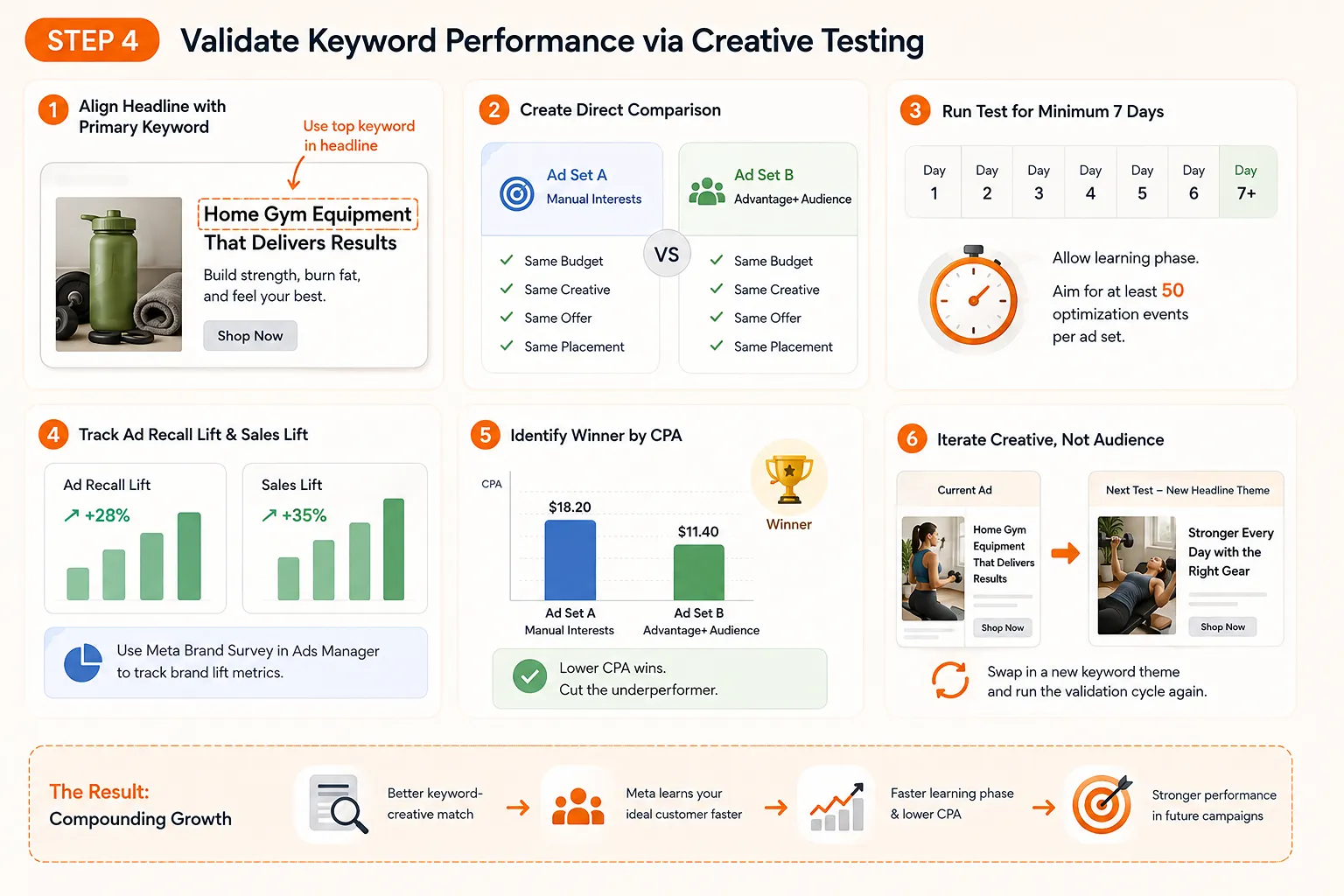
What you will find over multiple iterations is a compounding effect: each validated keyword-creative pairing sharpens Meta’s understanding of your ideal customer, making subsequent campaigns faster to exit the learning phase. The next section brings all four steps together into a set of actionable principles for sustaining that momentum over the long term.
How to Maximize ROI: Key Takeaways for Facebook Keyword Strategy
Pulling together a high-ROAS Facebook keyword strategy requires more than a strong interest list. It demands disciplined creative alignment, a willingness to trust Meta’s machine learning, and a system for measuring what is actually working. Use these steps to consolidate everything covered in this guide into a repeatable process.
Stop guessing at competitor spend. Use ad intelligence to identify which keywords your competitors are actively investing in. A Facebook audience targeting tool free of manual guesswork — like a popular ad intelligence tool — lets you filter live ads by niche, longevity, creative angle, and revealing exactly which keyword-to-message combinations are sustaining spend. If a competitor’s ad has run for 30 or more days, that creative-keyword pairing is validated by real market data, not assumptions.
Let creative carry the targeting signal. Shift your mindset: creative is no longer just a design choice, it is a targeting mechanism. The copy you write, the pain points you name, and the vocabulary you use all feed Meta’s algorithm behavioral cues about who should see the ad. According to Meta and Nielsen research, campaigns using data-driven creative insights perform 1.5x better in ad recall. Front-loading your highest-intent keywords in headlines and opening lines gives the algorithm the clearest possible signal.
Trust the algorithm with Advantage+ inputs. Feed your keyword research into Advantage+ as directional suggestions, not rigid constraints. As covered in Step 3, Meta’s audience targeting options are designed to expand beyond your seed list when doing so improves performance. Resisting that expansion often caps your reach unnecessarily. Treat your keyword list as the starting conversation, not the final word.
Monitor ad longevity as your performance signal. Any ad that remains active for 30 or more days without creative refresh is statistically surviving Meta’s optimization pressure. That is a reliable proxy for keyword-creative resonance. Build a simple tracker — even a spreadsheet — that logs first-seen dates for your top competitors’ ads. Patterns in what stays live will consistently outperform any keyword volume metric.
Iterate on creative, not just audiences. When a campaign underperforms, the instinct is often to adjust targeting. In practice, a stronger move is to revisit whether the keyword intent matches the creative message. As noted in Step 4, a single creative variable test against your validated keyword list tends to surface actionable insights far faster than broad audience reshuffling.
Apply these steps in sequence and you have a closed-loop system: intelligence informs keywords, keywords shape creative, creative trains the algorithm, and longevity data tells you what to scale. That is how Facebook keyword strategy moves from guesswork to a repeatable, ROAS-positive engine.
To keep this process repeatable, use a tool like PrimeSpy to monitor long-running competitor ads and spot new keyword-message patterns before they become obvious across the market.