Meta Ad Library Search: Find, Filter, and Analyze Facebook Ads
- Author
- PrimeSpy Research Team
- Published
- Jul 12, 2026
- Updated
- Jul 15, 2026

Summary: Meta Ad Library Search works best as a research tool, not a performance dashboard. This guide explains how to find and filter Facebook ads by brand, keyword, Page, country, placement, status, media type, and date, then analyze offers, hooks, CTAs, landing pages, and ad patterns to build better test ideas.
Meta is still one of the largest paid social ecosystems. In Q1 2026, Meta reported 3.56 billion Family Daily Active People and a 19% year-over-year increase in ad impressions across its Family of Apps, according to Meta’s Q1 2026 results.
That scale is why Meta Ad Library Search matters. Before you write a new hook, build a creative brief, or decide what to test next, you can see what brands are already putting into the market across Meta platforms.
This guide shows you how to find, filter, and analyze Facebook ads without treating the Ad Library like a performance dashboard. It is a research tool. Used well, it helps you ask better questions before you spend.
Key Takeaways
- Meta Ad Library Search helps you find active ads by advertiser, keyword, Page, and related brand terms.
- Facebook Ad Library and Meta Ad Library usually refer to the same public ad transparency tool.
- You can review creative, copy, CTAs, destination links, placements, and active status.
- You usually cannot see ROAS, CPA, exact targeting, or full spend data for normal commercial ads.
- The best use is not copying competitors. It is turning public ad patterns into better test ideas.
What Meta Ad Library Search Shows Advertisers Today
Meta Ad Library Search is Meta’s public ad transparency tool. Meta describes the Ad Library as a searchable database that helps people get more information about ads they see across Meta technologies. You can start from the official Meta Ad Library and search by keyword or advertiser.
For marketers, the value is simple: you can see the public-facing side of another brand’s ad strategy without needing access to its ad account. You may find ad creative, copy, headlines, calls to action, landing page links, Page information, delivery status, and platform placement details.
The tool was built for transparency, not competitor research. That distinction matters. If you use it as a research layer, it becomes useful. If you use it as a performance dashboard, it will mislead you. The official Meta Ad Library tools page frames the Ad Library as a transparency resource, not as an analytics product for advertisers.
Who Should Use Meta Ad Library Search First
If you searched for “Facebook Ads Library,” “Instagram ad library,” “how to see a brand’s active ads,” or “how to see competitors’ Facebook ads,” you probably want a practical answer. You want to know where the tool is, how to search it, what the results mean, and how to turn those ads into better campaign ideas.
Meta Ad Library Search is most useful for people who need outside-in ad research. A media buyer can use it before writing a new test plan. A SaaS marketer can use it to study how competitors explain features, pricing, proof, and objections. An ecommerce team can compare hooks, offers, bundles, UGC angles, and seasonal pushes. An agency can use it before a pitch to understand a prospect’s market.
| Search Goal | Best Query Type | What to Look For | Practical Use |
|---|---|---|---|
| Find a brand’s ads | Advertiser or Page name | Active ads, repeated offers, creative formats | Brand research |
| Study a market | Category keyword | Common hooks, claims, CTAs | Message research |
| Review competitors | Brand plus product terms | Positioning, landing pages, funnel angle | Competitor analysis |
| Build ad tests | Pain point or outcome phrase | Objections, offers, creative patterns | Test planning |
For competitor research, the goal is not to collect random screenshots. The goal is to build a repeatable workflow for finding ads, reading patterns, and turning those patterns into tests.
How to Access Meta Ad Library Search Quickly
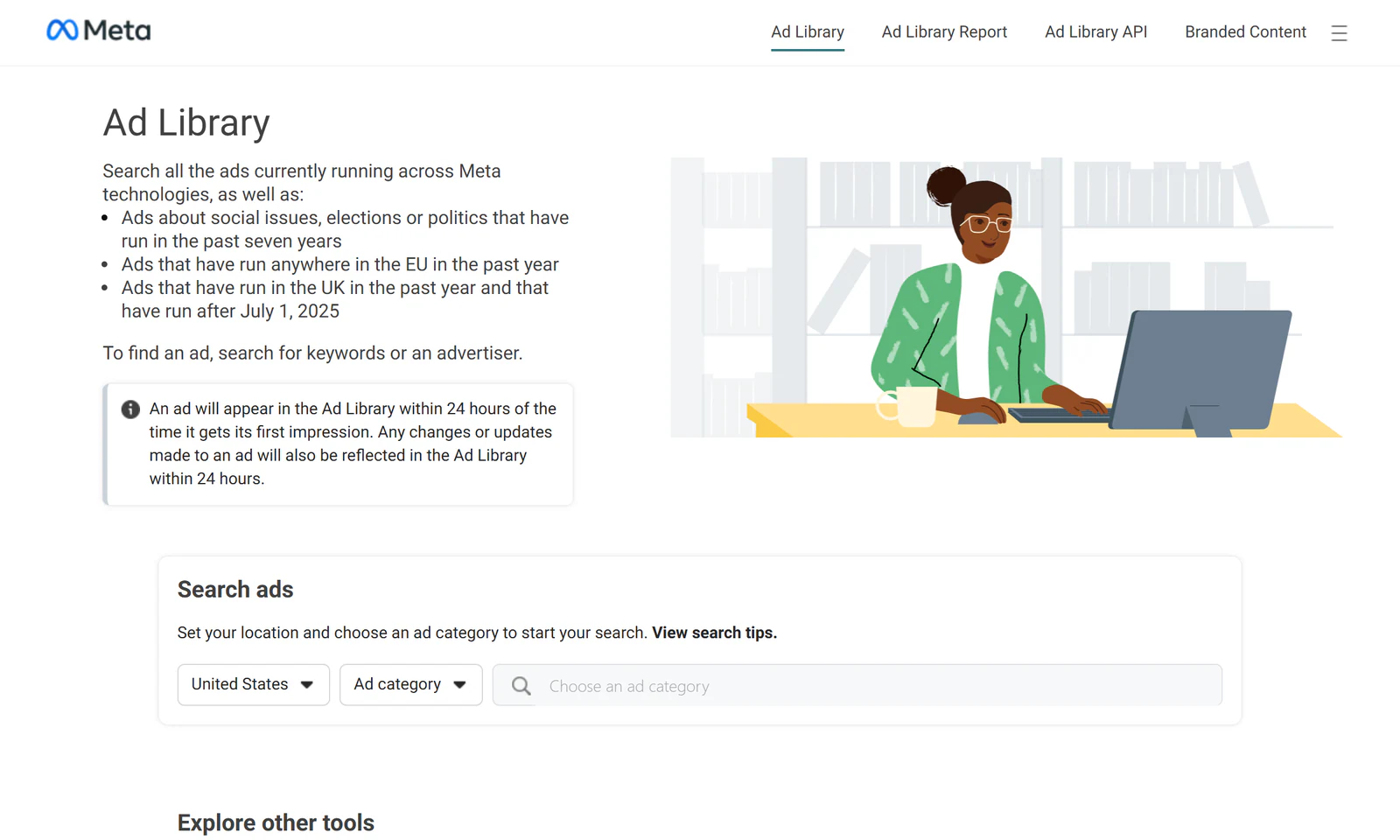
The fastest path is the official Meta Ad Library. Choose a country, pick an ad category, and search for a brand, advertiser, Page, keyword, or topic. For most commercial research, start with “All ads” when that option is available in your market. If you are researching political or issue ads, choose the relevant category because Meta may show extra transparency information for those ads.
You may also find active ads from a brand’s Facebook Page or Instagram profile. On Instagram, Meta’s help documentation says users can open “About This Account” and view active ads in the Meta Ad Library when that option is available. You can read Meta’s guidance here: How do I view an account’s active ads on Instagram?
On Facebook, Page transparency can also help when a direct advertiser search does not return the Page you expected. In practice, this is useful when the advertiser name is hard to match, when a company uses several Pages, or when a local branch runs ads separately from the main brand.
If results look empty, do not assume the brand is not advertising. Try the exact Page name, brand name variations, parent company name, product name, and terms from the landing page. Some advertisers run ads from regional Pages, partner Pages, or campaign-specific Pages.
How to Search by Brand, Keyword, or Page
A good Facebook Ads Library search starts broad, then narrows. If you start too narrow, you may miss the advertiser because the Page name does not match the brand name you had in mind. If you start too broad, you get pages of weak matches.
The practical workflow is simple: search the advertiser, confirm the Page, test product and category keywords, then use filters to clean the results. This gives you enough coverage without turning the research into a messy link hunt.
Search by Advertiser Name
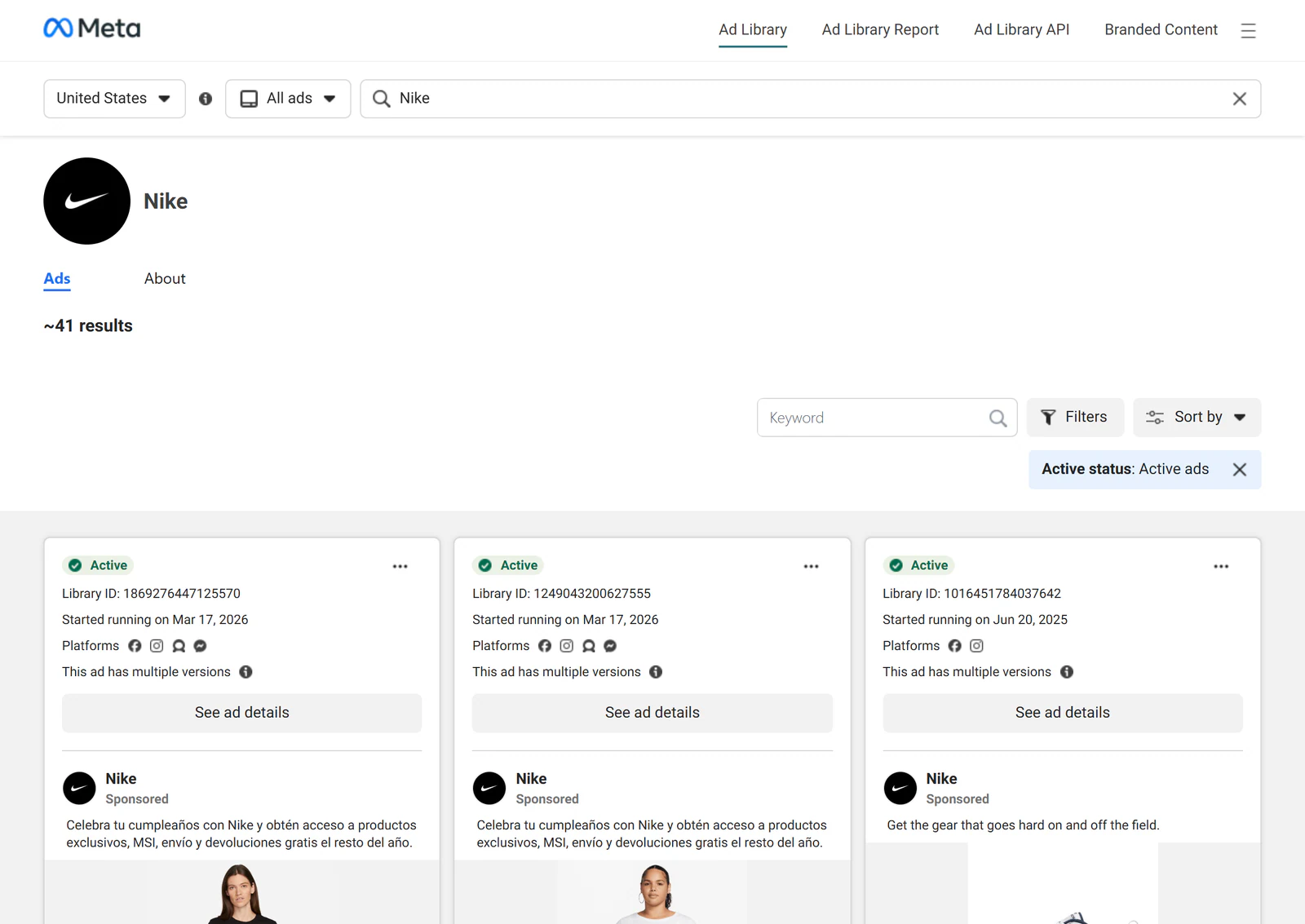
Start with the brand’s public name. If the brand appears in the dropdown, choose the Page rather than relying only on keyword results. This usually gives cleaner results because you are looking at ads tied to a specific advertiser.
For larger companies, check whether they have regional Pages, product Pages, or parent-company Pages. A SaaS brand may run ads from the main company Page, but a product launch, event, or sub-brand may have its own Page.
Search by Product or Category Keyword
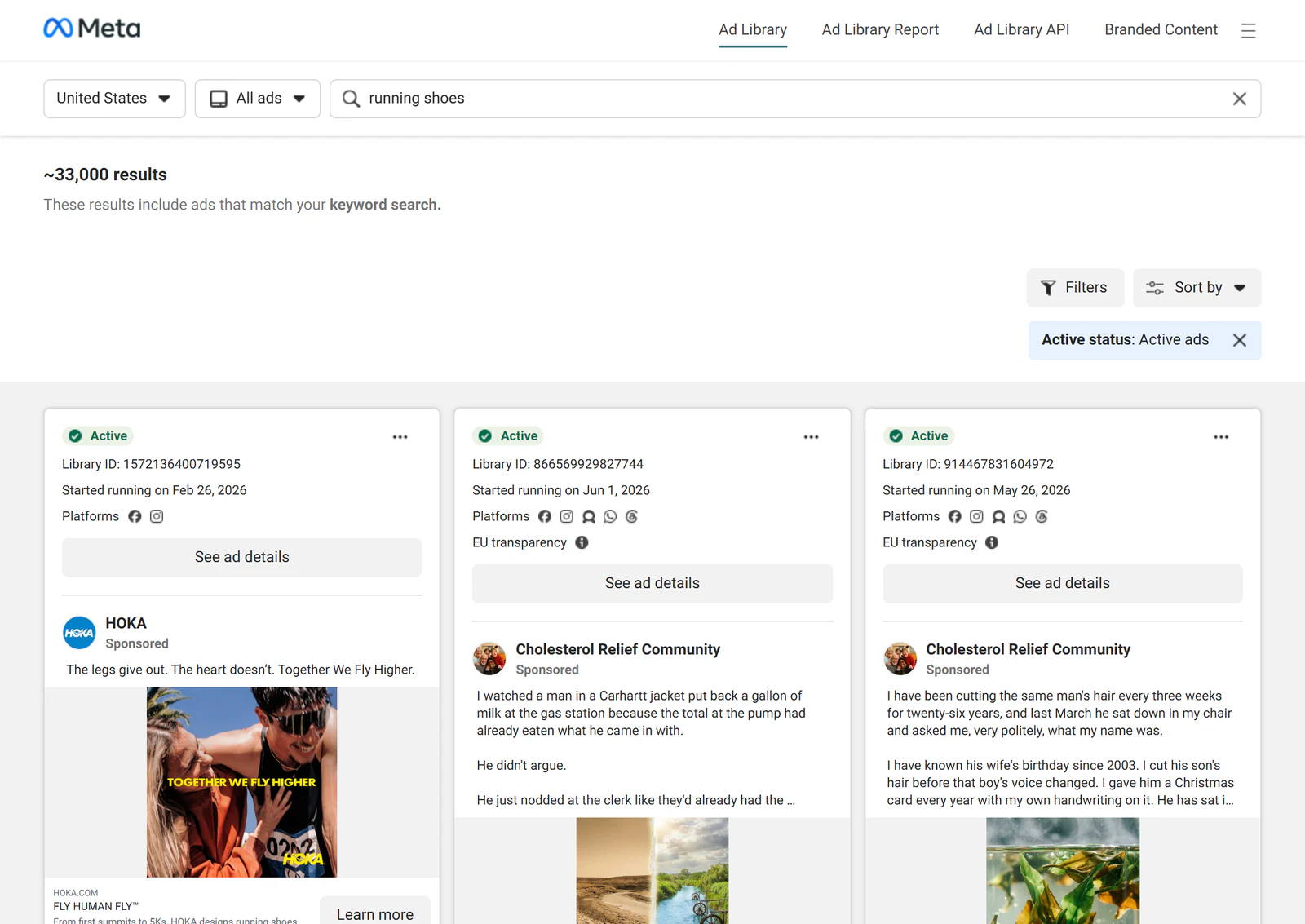
Keyword search helps when you do not know which brands to study yet. Search product terms, use cases, pain points, or outcomes. A project management SaaS team might search “resource planning,” “agency reporting,” or “client approvals.”
The goal is not to find every ad. The goal is to see how the market talks. If several brands lead with the same pain point, that is a signal worth testing. It is not proof that the message works.
Search by Competitor Messaging
Search phrases from competitor homepages, ad headlines, pricing pages, and review language. This helps you see whether a brand carries the same message from site to ad, or whether paid social uses a sharper angle.
Pay attention to repeated claims. If the same claim appears across many ads and formats, it may be part of a deliberate campaign. If it appears once, treat it as a test, not a strategy.
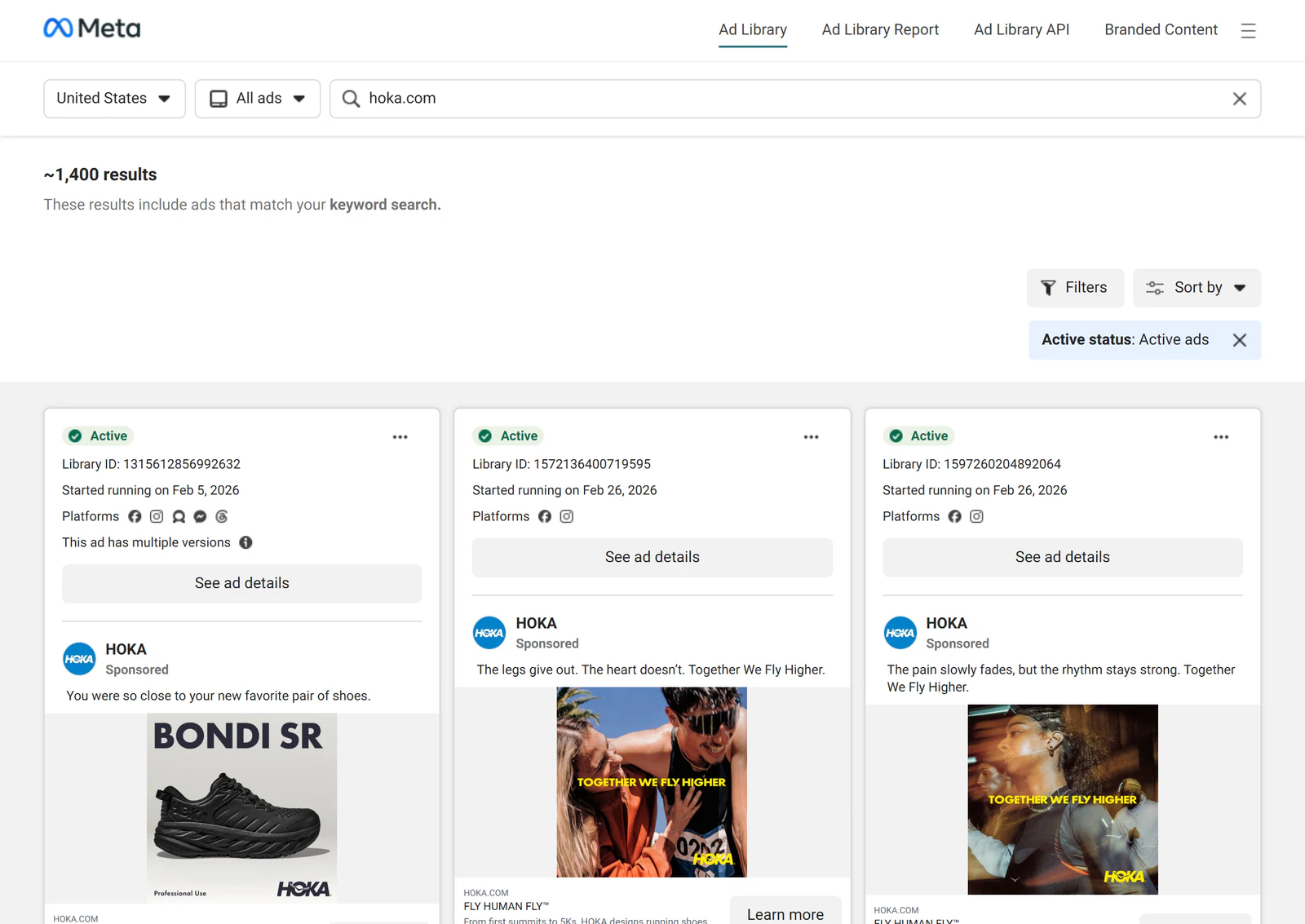
Search by Domain or Website Name
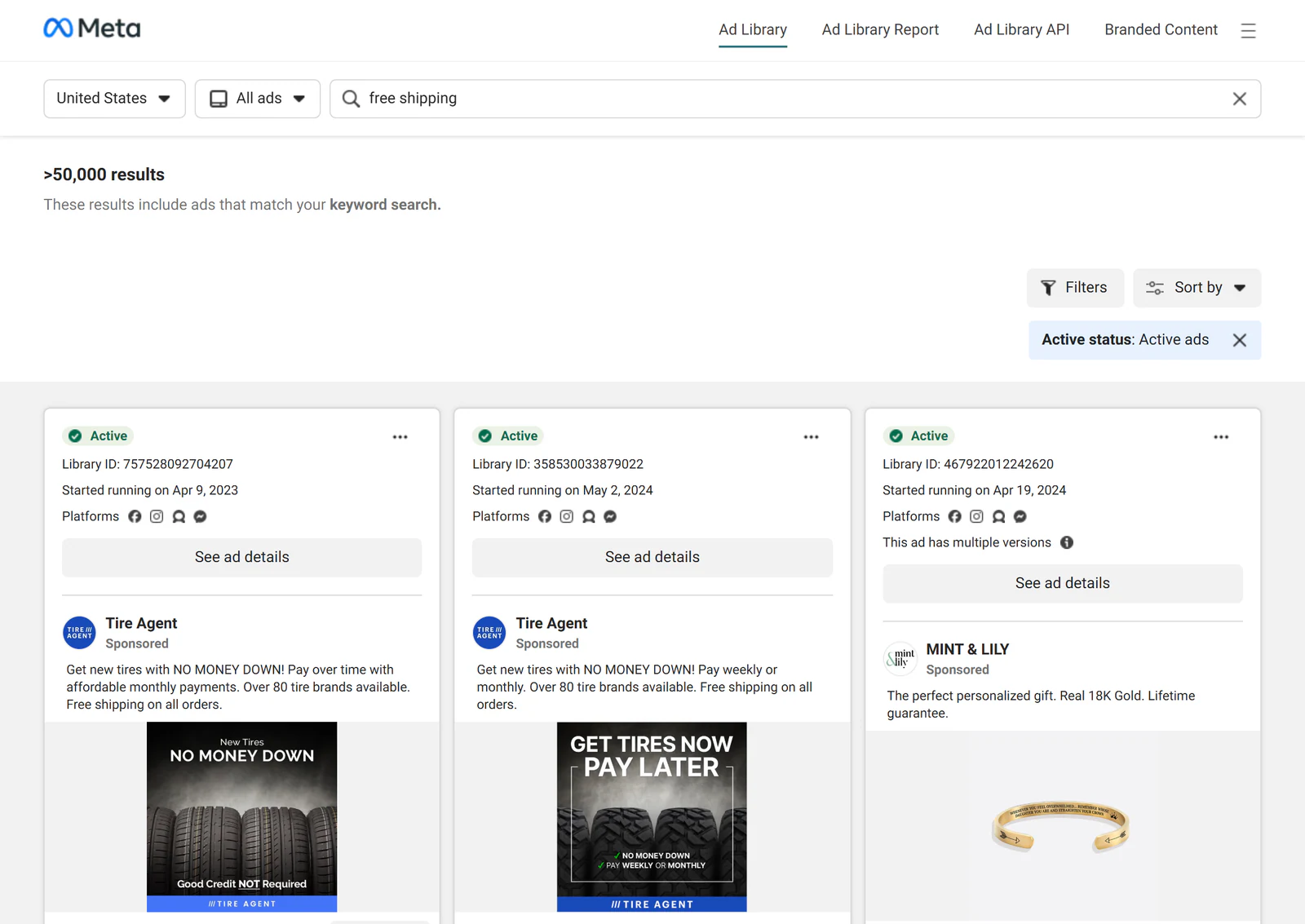
Some marketers want to search ads by website or domain, not only by Page. Meta’s native search is not always a clean domain search tool, but domain terms can still help.
Search the domain without “https,” the brand name inside the domain, and product-specific landing page terms. Then inspect destination links inside matching ads to confirm whether the ad sends traffic to the site you care about.
Search When Brand Names Do Not Match
Brand names and Page names often differ. A holding company may own the Page. A franchise may advertise from a regional Page. A marketplace seller may run ads under a store name that does not appear on the main website.
When this happens, use a chain of clues: domain, product name, logo, landing page URL, Page transparency, and ad creative. It takes a few extra minutes, but it prevents a bad conclusion, like assuming a brand is inactive when you searched the wrong name.
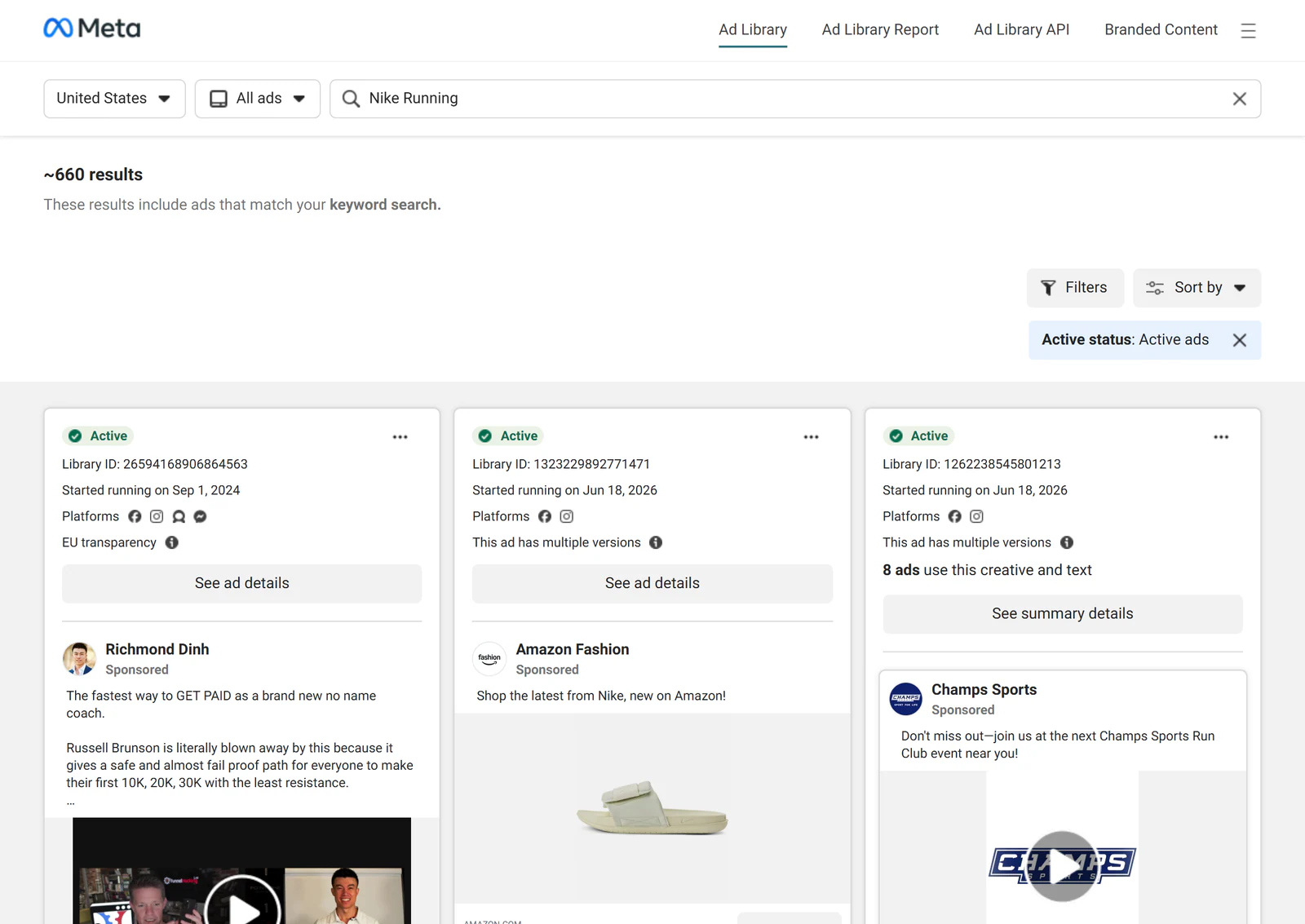
Filters That Make Meta Ad Library Search Useful
Filters turn a messy search into a useful research set. Without filters, you may mix old ads with new ads, one country with another, and Facebook feed ads with Instagram or Reels placements. That makes patterns harder to read.
A good filter setup should match the decision you are trying to make. If you are planning U.S. creative tests, focus on the U.S. market first. If you care about short-form video hooks, do not spend most of your time reviewing static image ads.
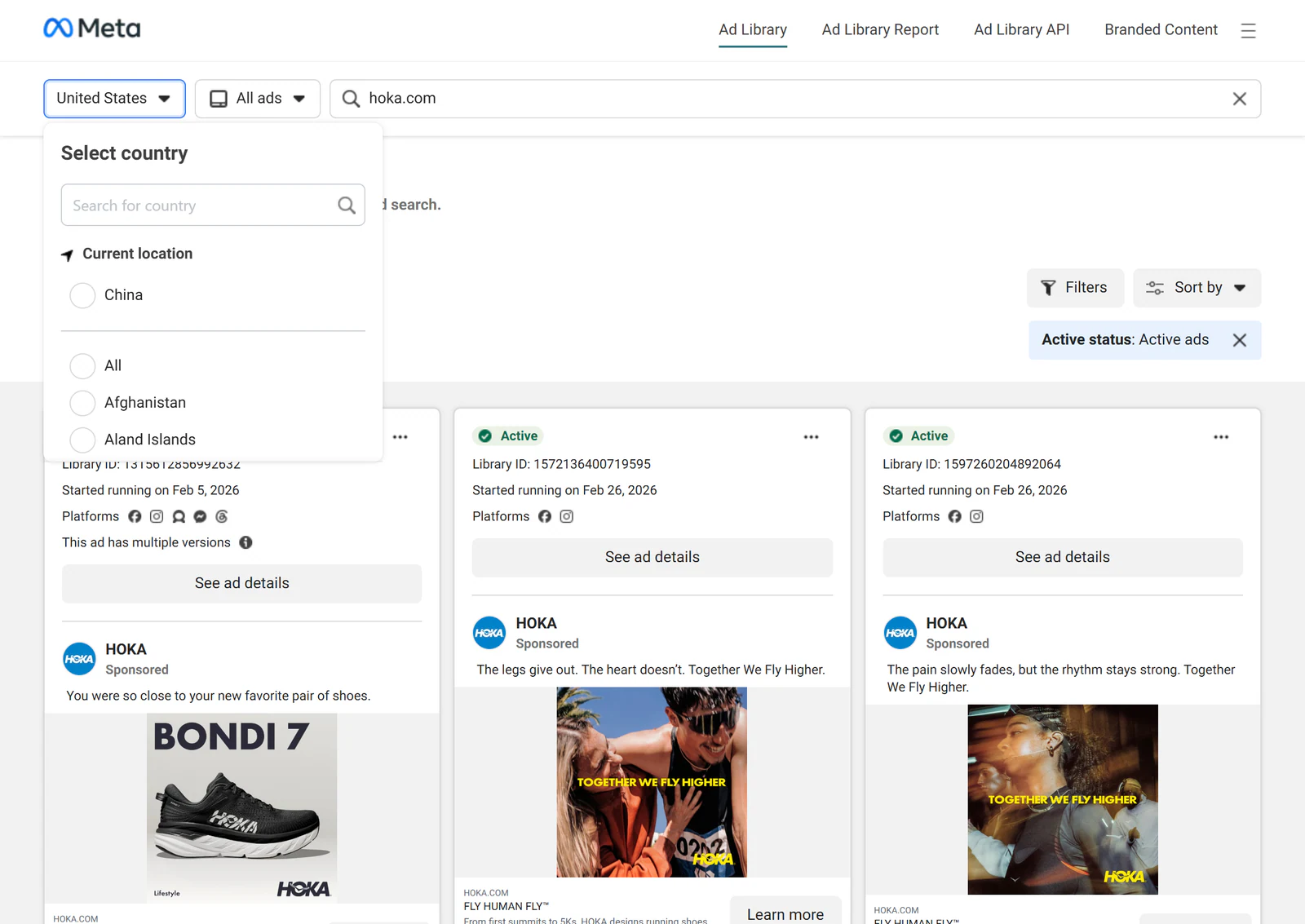
Filter by Country or Region
Country filters matter because offers, pricing, claims, compliance rules, and buyer awareness differ by market. A competitor may run aggressive offer ads in one country and education-led ads in another.
Pick the market you care about first. If you sell in several markets, compare them side by side. That is usually more useful than trying to draw one global lesson from mixed results.
Filter by Platform Placement
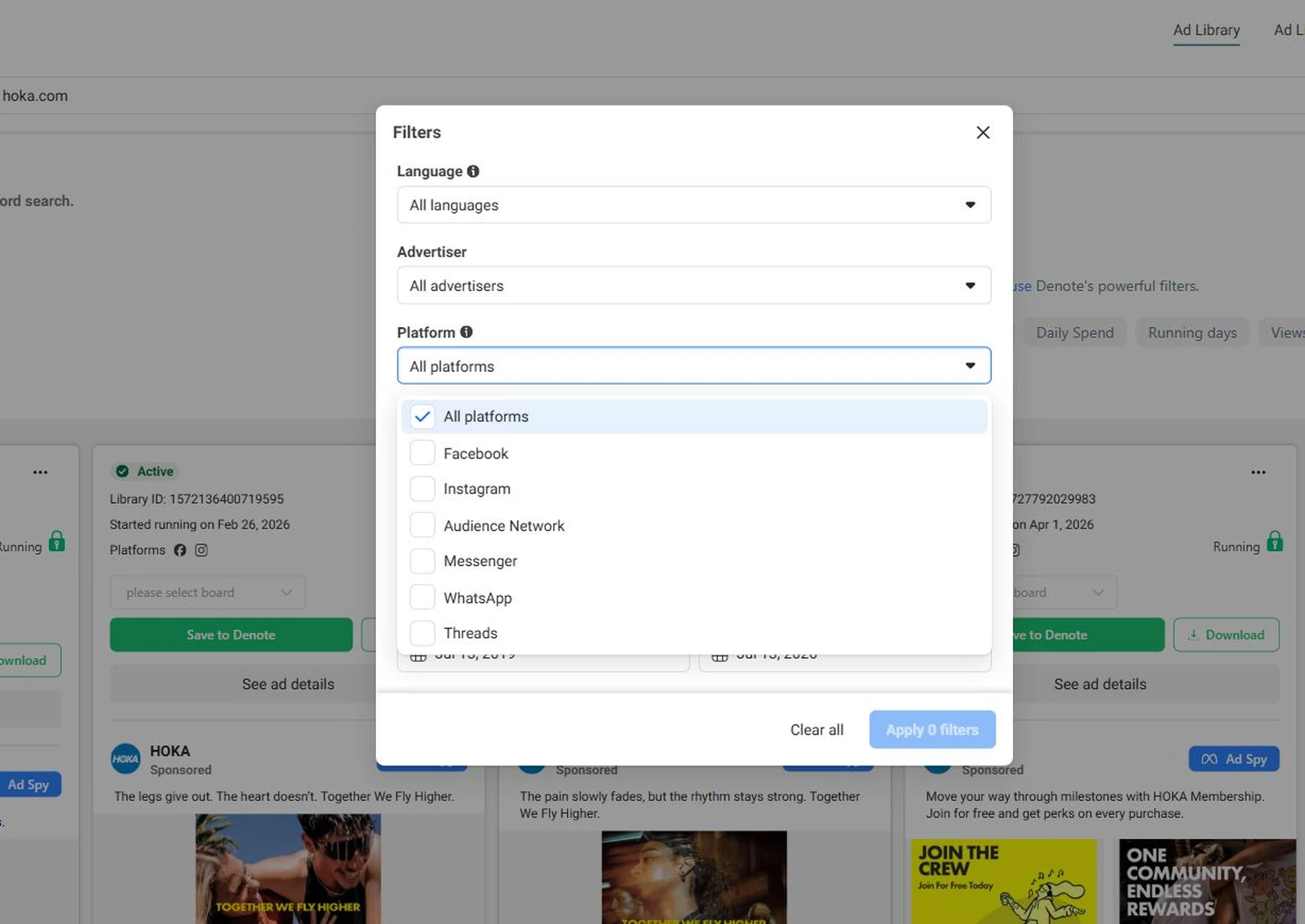
Meta ads can run across Facebook, Instagram, Messenger, and other Meta placements. Placement affects creative style. Instagram ads may lean more visual. Facebook feed ads may carry more copy. Reels ads need stronger opening frames.
Use placement filters to see how a brand adapts the same offer across formats. The offer may stay the same while the hook, visual pacing, and CTA change.
Filter by Active or Inactive Ads
Active ads show what a brand is running now. That makes them useful for current market research. Inactive ads can still help when you want to understand past tests, seasonal pushes, or abandoned angles.
The mistake is treating active status as proof of performance. An active ad may be profitable, but it may also be a new test, a small retargeting ad, or a low-budget awareness asset. Active status is a clue, not a verdict.
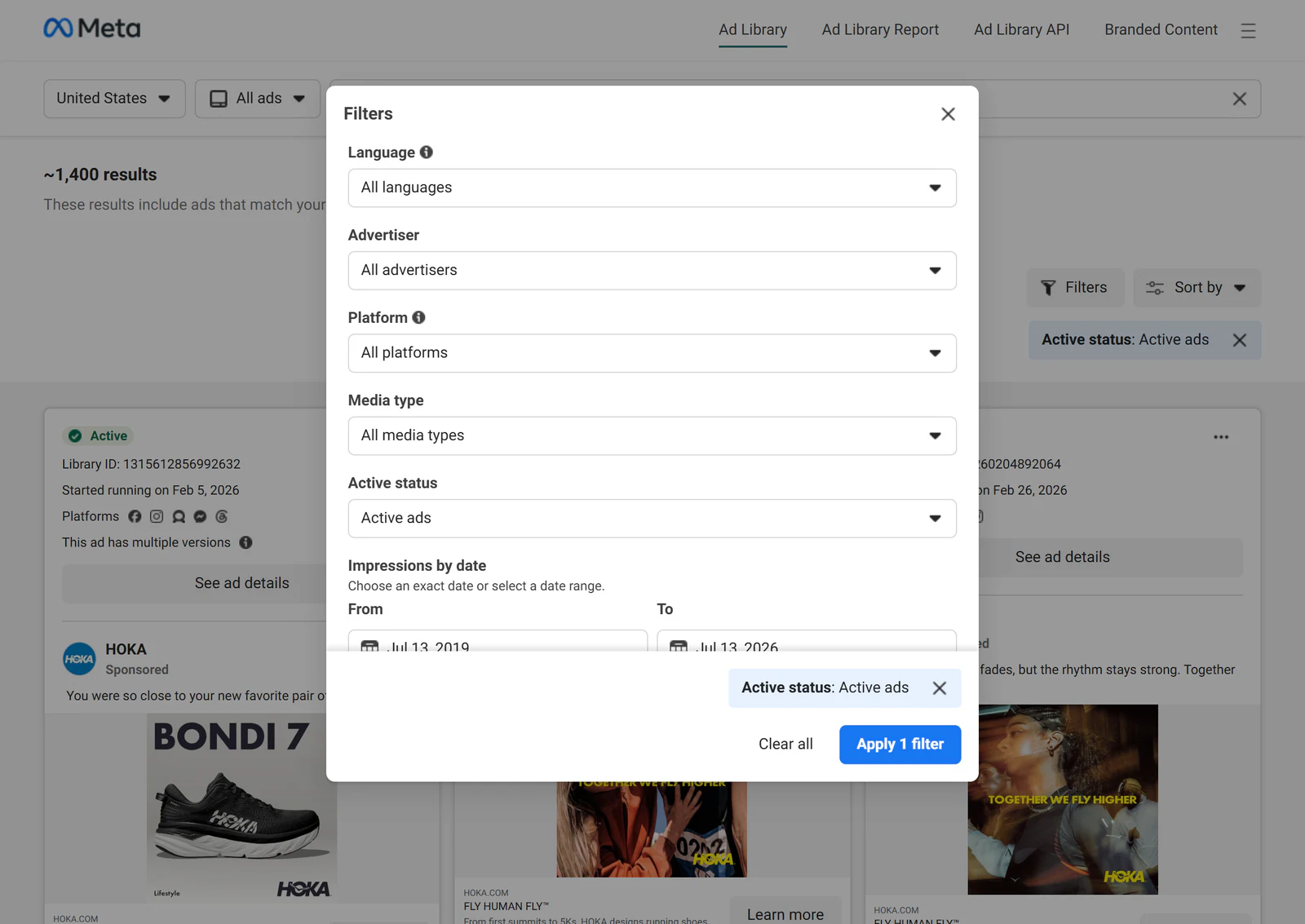
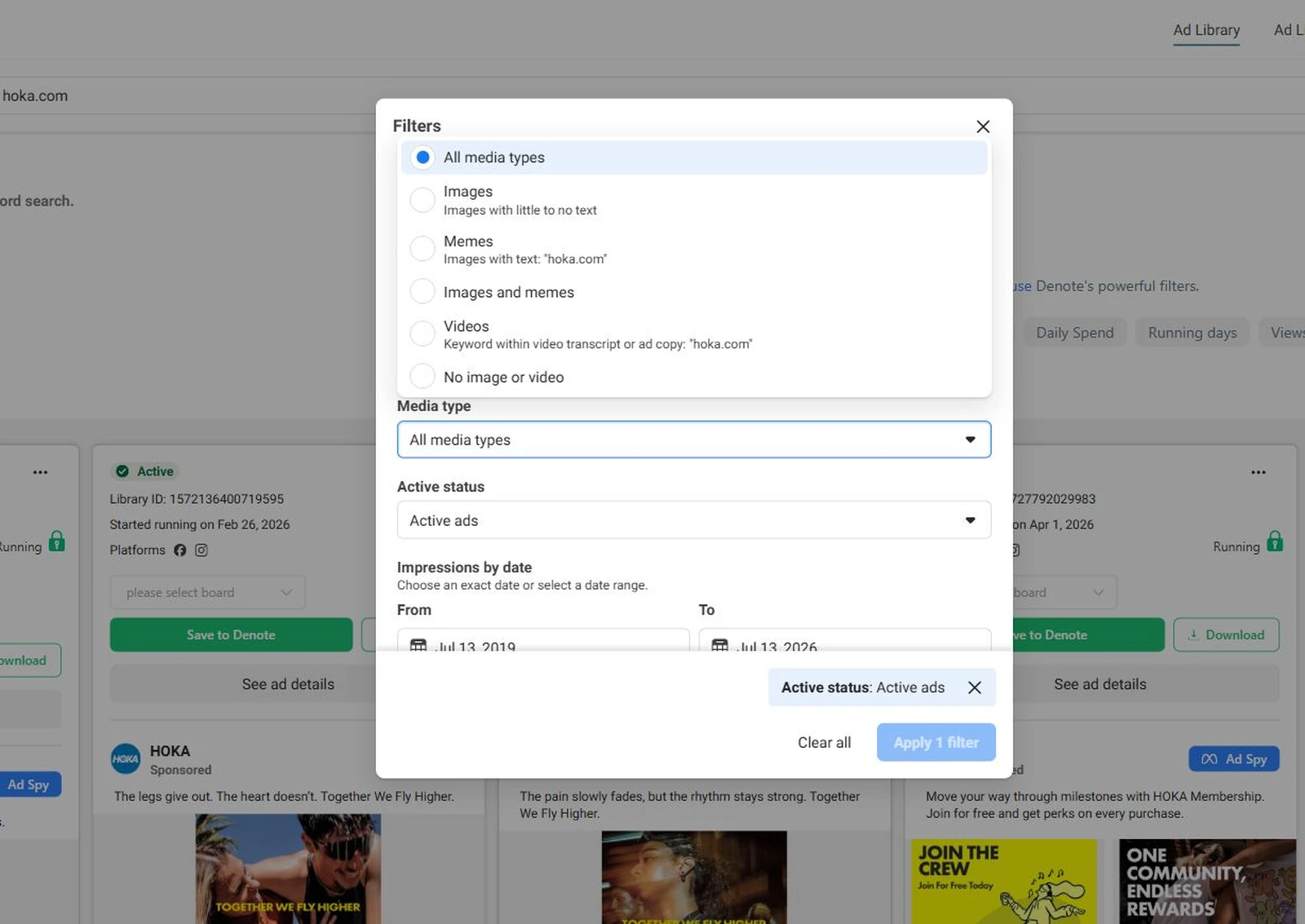
Filter by Media Type and Date
Media type and date filters help you avoid mixing formats that should be judged differently. A carousel ad, UGC-style video, static image, and product demo do different jobs.
Date filters also help you spot campaign pushes. If many ads started in the same week, the advertiser may be launching a new offer, testing a new angle, or preparing for a seasonal event.
What Data You Can See in Each Ad
In many Meta Ad Library results, you can inspect the ad creative, copy, headline, CTA, destination link, advertiser Page, delivery status, start date, and placement. Meta’s official Business Help Center page about the Meta Ad Library describes it as a hub for ad transparency across Meta technologies.
For political, social issue, election, UK, and EU ads, Meta may provide more information than it does for regular commercial ads. That can include spend and impression ranges, depending on the ad type and region. For normal ecommerce, SaaS, or local business ads, you should expect creative and copy visibility, not full performance visibility.
Results Count and Active Ad Signals
Searchers often look at the number of results because they want a quick read on advertiser activity. Use that carefully. A large set of active ads may mean scale, but it can also mean many small tests, duplicated creatives, regional variants, or dynamic creative versions.
A small result set may mean low activity, but it may also mean the advertiser uses fewer Pages or more concentrated creative. Count ads, but read the ads too. The pattern matters more than the raw number.
What Meta Ad Library Search Does Not Reveal
Meta Ad Library Search does not show the full truth behind an ad. For most commercial ads, you cannot see exact ROAS, CPA, conversion rate, full budget, audience targeting, or profit. You may see that an ad has been active for a long time, but you do not know whether it is scaling, barely spending, or kept live for retargeting.
A public signal is not the same as business truth. This is where many marketers overreach.
Use Meta Ad Library Search to learn what a brand is willing to put into market. Use your own ad account, analytics, CRM, surveys, and landing page tests to learn whether a similar idea works for you.
Useful limits to remember:
- Active status does not prove profit.
- Ad volume does not prove budget.
- Repeated copy does not prove conversion.
- Missing results do not prove a brand is not advertising.
- Spend and reach ranges are not available for every ad type.
The Ad Library is good at showing public creative behavior. It does not replace Ads Manager, third-party analytics, or customer research.
How to Analyze Competitor Ads with Clear Criteria
A useful competitor analysis starts with criteria before opinion. Do not open a competitor ad and ask, “Do I like this?” That is too loose.
Ask better questions. What offer does the ad make? Who does it seem to address? What pain point does it lead with? What creative format does it use? Where does the click go? This turns competitor ad research into a working system instead of a screenshot folder.
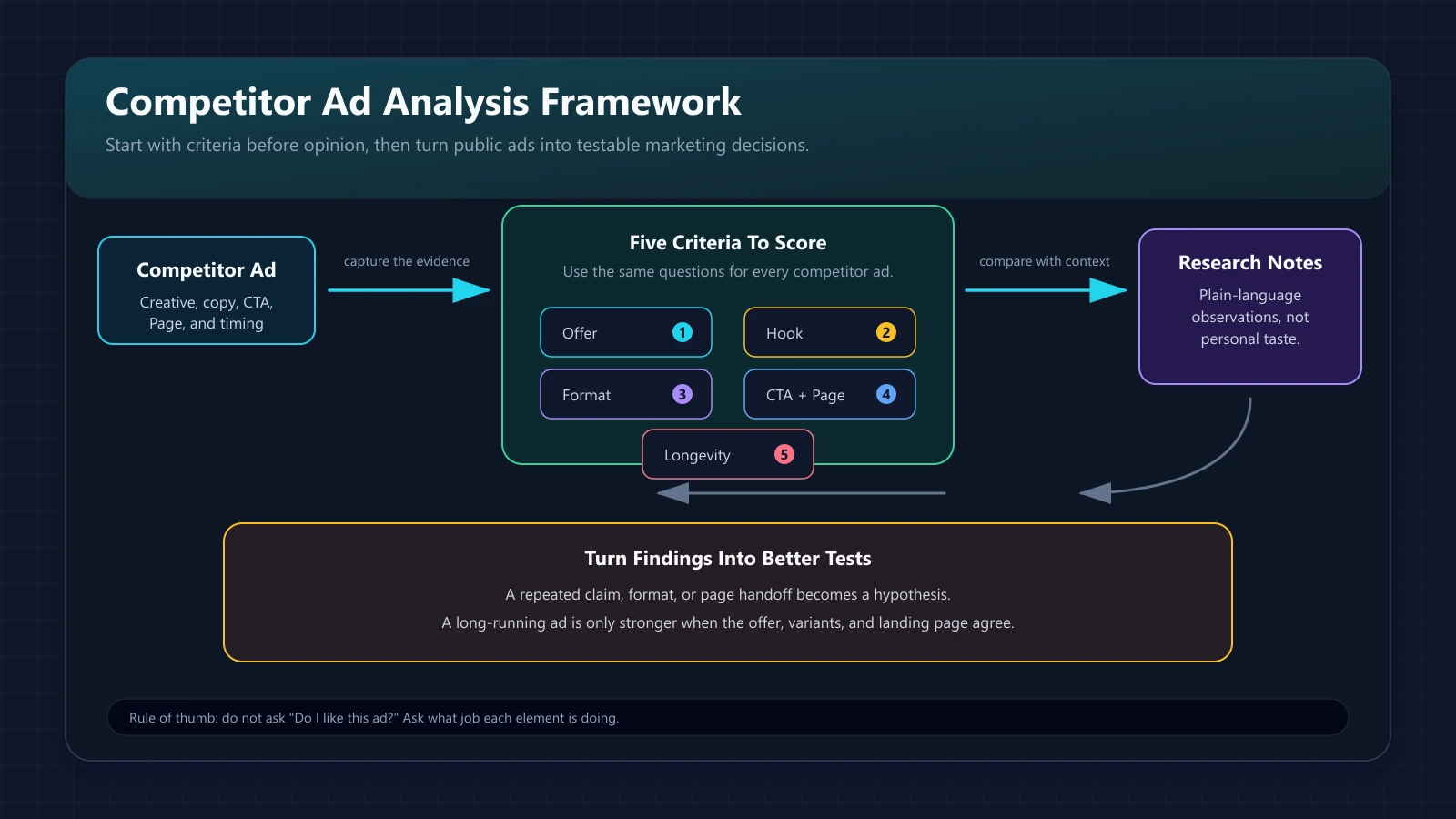
Check the Offer
The offer is usually the clearest part of the ad. It may be a discount, free trial, demo, audit, bundle, guide, webinar, or direct purchase.
Write the offer down in plain language. Then ask whether it reduces risk, increases urgency, or makes the next step easier. In SaaS, a free demo and a free template attract different levels of buyer intent. Do not compare them as if they do the same job.
Study the Hook
The hook is the first idea the ad uses to earn attention. It may name a pain point, promise a result, call out an audience, or show a before-and-after.
For video, study the first few seconds. For static ads, look at the main visual and first line of copy. Strong hooks are usually specific. Weak hooks sound like they could belong to any brand in the category.
Review Creative Format
Creative format tells you how the brand wants the message to land. A founder video can build trust. A product demo can reduce confusion. A customer quote can lower risk. A comparison graphic can sharpen positioning.
Do not judge format in isolation. Ask why that format fits the offer. If a competitor keeps using the same format across many ads, that is worth noting.
Compare CTAs and Landing Pages
The CTA and landing page show the real funnel goal. An ad that says “Learn More” but sends users to a pricing page has a different intent from one sending users to a guide.
Click through when possible and compare the ad promise to the landing page promise. Many teams only study ad creative. That misses the handoff. The strongest insight often sits between the ad and the page.
Use Ad Longevity Carefully
Ad longevity is tempting because it looks like proof. If an ad has run for months, it may be working. It may also be a low-budget retargeting ad, a brand awareness asset, or a campaign the team forgot to pause.
Treat longevity as a clue. If a long-running ad also has a clear offer, repeated variants, and a matching landing page, the signal gets stronger.
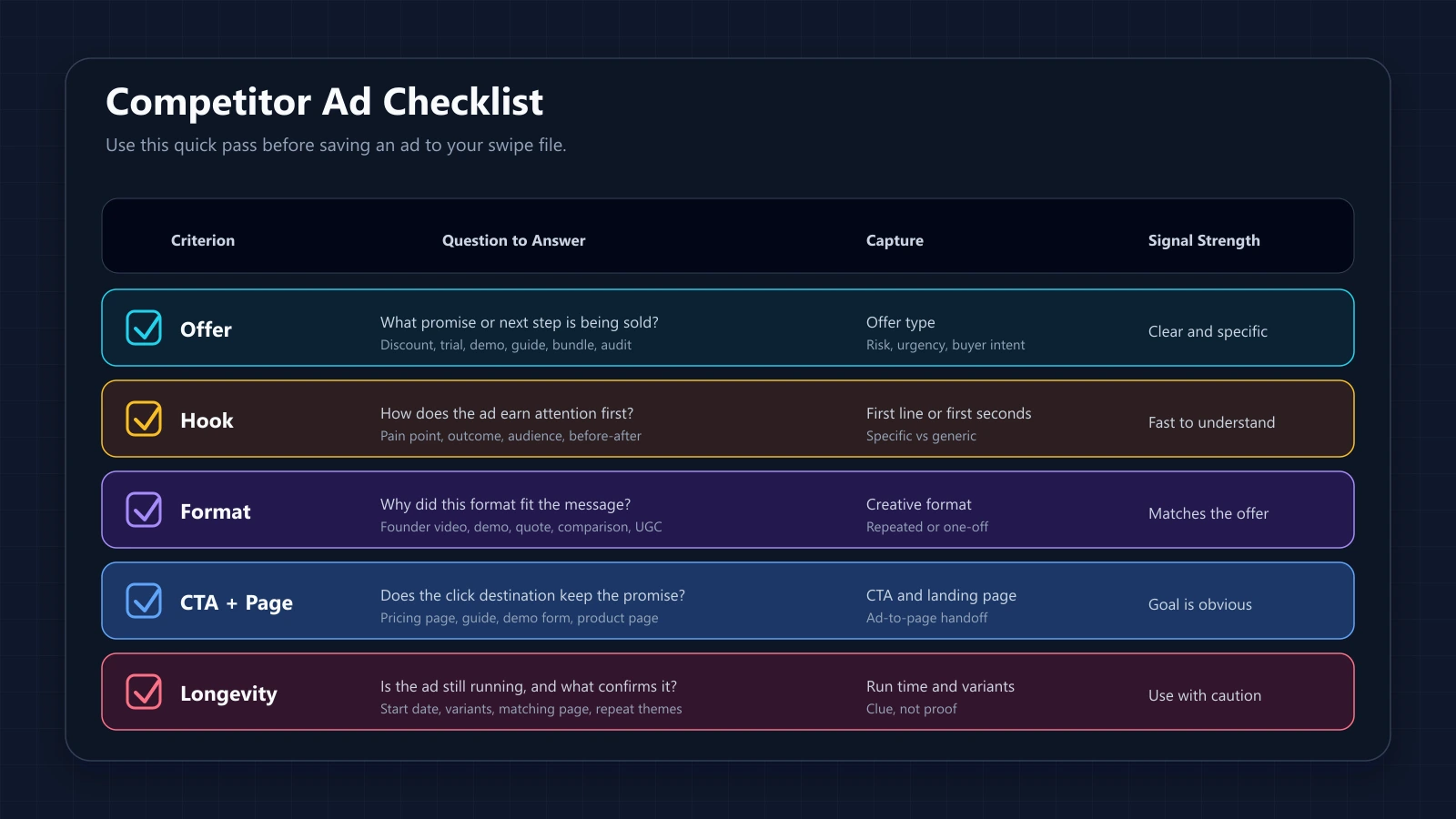
Build a Swipe File from Ad Library Research
A swipe file is useful only if it helps you make decisions later. Dumping screenshots into a folder is not research.
When you save ads from the Ad Library, tag them by offer, audience, funnel stage, hook, creative format, CTA, objection, and landing page. That way, you can return later and find patterns without rereading every ad from scratch.
For a SaaS team, useful tags might include “demo request,” “free template,” “ROI claim,” “integration angle,” “security objection,” and “migration pain.” For ecommerce, tags might include “bundle,” “seasonal sale,” “UGC proof,” “founder story,” and “problem-solution demo.”
Keep one rule in the file: inspiration is allowed, copying is not. Copying a competitor’s ad can damage trust and usually misses context. The better move is to extract the underlying idea and rebuild it for your own customer, offer, and proof.
Turn Search Findings into Better Facebook Ad Tests
The best outcome of Meta Ad Library Search is a better test backlog. You are not trying to crown a winner from public data. You are trying to reduce guesswork before you spend.
If several competitors lead with the same objection, turn that into a test. If many strong brands in the space use demo-led video, test whether your product needs the same kind of proof. If no one talks about a pain point your customers mention often, that may be an opening.
Convert Patterns into Hypotheses
A pattern is something you observe. A hypothesis is something you can test.
“Competitors use founder videos” is a pattern. “A founder-led video will improve demo conversion because buyers need more trust before booking” is a hypothesis. This shift matters because it connects the Ad Library finding to a business reason, not just a creative preference.
Build New Creative Angles
Turn each useful pattern into a creative angle. If competitors sell speed, test control or accuracy. If competitors sell low price, test lower risk. If competitors sell features, test outcomes.
The goal is not to be different for the sake of being different. The goal is to find a sharper promise that still matches what your product can prove.
Prioritize Tests by Effort and Impact
Not every idea deserves production time. Rank ideas by expected impact, effort, and confidence. A copy-only test is easier than a full video shoot. A landing page claim test may matter more than a small CTA change.
If you are short on creative resources, start with ideas that can be tested with existing assets. The Ad Library can give you ideas, but your constraints decide the order.
Track What You Learned
A test without a learning log becomes another forgotten campaign. Track the original observation, your hypothesis, the ad variant, the audience, the landing page, and the result.
This gives your team a memory. Over time, you will learn which competitor patterns matter in your market and which ones only looked good in screenshots.
Meta Ad Library Search Examples for Real Campaigns
Examples make the workflow easier to use. A subscription ecommerce brand, a B2B SaaS company, and a local service business will search differently because their buying cycles are different.
Still, the research habit is the same: search the market, inspect the ads, identify patterns, and turn those patterns into tests.
Ecommerce Brand Example
An ecommerce brand selling skincare could search competitor brand names, ingredient terms, and problem phrases like “dark spots” or “sensitive skin.”
In the results, the team should look for bundles, before-and-after claims, UGC videos, creator styles, and seasonal offers. If several active ads lead with customer routines instead of product claims, that suggests a test: show the product inside a routine rather than as a standalone item.
SaaS Competitor Example
A SaaS team might search direct competitors, category phrases, and pain points from review sites. A reporting tool could search “client reporting,” “agency dashboard,” and competitor Page names.
The team should compare offers: demo, free trial, template, calculator, or webinar. If competitors push templates at the top of funnel but demos at the bottom, that gives you a funnel clue. Match the ad offer to buyer readiness.
Local Service Business Example
A local service business can use the Ad Library to study nearby competitors, franchise Pages, and service keywords.
A dental clinic, HVAC company, or home remodeling firm should look at geography, offer timing, proof, and urgency. Local ads often rely on trust signals: reviews, financing, before-and-after visuals, or fast booking. The useful question is not “What ad looks best?” It is “What promise makes a local buyer feel safe enough to call?”
Common Mistakes When Using Meta Ad Library Search
Most mistakes come from asking the tool to do too much. Meta Ad Library Search can show you public ad activity. It cannot tell you exactly why an ad exists, whether it is profitable, or what audience it targets.
That means your analysis needs restraint. Good marketers stay curious, but they do not pretend public data proves more than it can prove.
Copying Ads Too Closely
Copying is lazy and risky. It also ignores context. Your competitor may have a different brand, margin, audience, price, funnel, and sales team. A hook that works for them may fail for you because your proof is different.
Instead of copying the line, identify the job the line is doing. Is it reducing fear? Creating urgency? Naming a pain? Use that job to write your own version.
Assuming Active Means Profitable
This is the most common mistake. An ad can be active for many reasons. It may be profitable, but it may also be a new test, a retargeting ad, a low-spend awareness ad, or a duplicated creative.
Ask better follow-up questions. How old is the ad? Are there variants? Does the landing page match? Is the offer repeated across formats?
Ignoring Landing Page Context
The ad is only the first half of the message. The landing page finishes the argument.
If the ad promises a free audit and the page asks for a demo, that changes the funnel. If the ad makes a bold claim but the page has no proof, that weakens the message. Always inspect the click path when possible.
Searching Too Narrowly
If you search only exact competitor names, you will miss category patterns. If you search only broad category terms, you will drown in weak results.
Use both. Start with direct competitors, then search product terms, pain points, and brand-related phrases. This helps you see both brand-specific tactics and market-wide messaging patterns.
Best Tools to Extend Meta Ad Library Search
The native Ad Library is enough for many manual checks. But if your team runs frequent competitor research, you may need a better system for saving, tagging, comparing, and reporting.
The right setup depends on how often you research ads and what you do with the findings afterward.
Native Search: Best for Quick Manual Checks
Native Meta Ad Library Search is best when you need a quick answer. Use it before a creative meeting, pitch, campaign review, or competitor audit.
It is free and direct. The tradeoff is organization. If you search often, you will quickly lose track of what you found unless you save links, screenshots, and notes somewhere else.
Ad Spy Tools for Larger Competitor Research
Ad spy tools can help when you need saved ads, filters, tags, bulk views, or cross-platform research. They are useful for agencies, growth teams, and creative strategists who review ads every week.
If you want a more organized way to review and save competitor ads, PrimeSpy is one option to consider. You can start with a free trial, use it alongside Meta Ad Library Search, and decide whether it fits your research workflow.
Spreadsheets and Swipe Files for Organization
A simple spreadsheet is often enough. Track advertiser, Page URL, ad link, start date, format, hook, offer, CTA, landing page, and your takeaway. Add tags so you can filter later.
For creative teams, pair the spreadsheet with a visual board. This keeps the research usable. The point is to build a library your team can actually return to.
API Access for Advanced Reporting Workflows
Meta also offers Ad Library tools for more structured research, including the Ad Library Report and API. The official Meta research tools page lists the Ad Library, Ad Library Report, Ad Library API, and ad targeting datasets as transparency resources.
API access is useful only when the available scope matches your research need. Before building a reporting workflow around it, read the current API rules and available fields carefully.
Meta Ad Library Search FAQs for Modern Marketers
Is Meta Ad Library Search free?
Yes. The public Ad Library is free to use. You can search ads from the official Meta Ad Library without paying for a third-party tool.
Is Facebook Ads Library the same as Meta Ad Library Search?
In most marketing conversations, yes. Facebook Ads Library is the older or more familiar name. Meta Ad Library is the broader current naming because it covers ads across Meta technologies.
Can I search Facebook ads by domain name?
Sometimes, but not perfectly. Try the domain, brand name, Page name, and product terms. Then confirm by checking destination URLs inside the ads.
Can I see how many active ads a brand runs?
You can review active ads in the library, but the count may not tell the whole story. Variants, duplicate ads, and filters can change what you see.
Can I see competitor ad spend?
For normal commercial ads, usually not exact spend. For social issue, election, political, UK, or EU transparency cases, Meta may show spend or impression ranges.
How often should I check competitor ads?
For most teams, monthly is enough. Check weekly during launches, seasonal periods, or major competitor moves. Daily checking usually creates noise.
Final Takeaways for Smarter Meta Ad Library Search
Meta Ad Library Search is best used as a research tool, not a shortcut. Use it to see what brands are saying in public, how they frame offers, which creative formats they repeat, and how their ads connect to landing pages.
Then slow down. Ask what the pattern might mean and what you can test from it.
A simple workflow works well: choose three competitors, review 20 active ads, tag the offer and hook, inspect the landing pages, and write five test ideas. That is enough to make your next creative meeting sharper. It will not tell you what will win. It will help you stop guessing from a blank page.
Used well, Meta Ad Library Search gives you a better starting point. The rest still depends on your customer, your offer, your proof, and your testing discipline.